At a certain point, spreadsheets and manual processes just don’t suffice. As your business scales, you need to manage stronger customer demands, stricter regulations, higher costs, and a more complex supply chain—all while keeping operations running smoothly, employees engaged, and profitability on track.
Cue Enterprise Resource Planning (ERP) software. ERP systems bring together critical business functions—operations, supply chain, sales, and finance—into one unified platform. By centralising data, automating workflows, and improving overall efficiency, businesses can streamline processes, make smarter decisions, and reduce operational costs.
If you’ve heard of ERP but aren’t quite sure how it works—or if you know the basics but want a deeper dive—this guide will break it all down. From what it is and when you need it to why it’s a smart investment and which features you should leverage, we’ve got you covered.
Skip straight to the information you’re looking for here:
What is an ERP system?
ERP, short for Enterprise Resource Planning, is a powerful software solution designed to centralise and streamline business operations across multiple departments. It integrates key functions like accounting, manufacturing, supply chain management, sales, marketing, and human resources (HR) into a single, cohesive system.
At its core, an ERP system simplifies and automates daily processes, breaking down operational silos and ensuring all teams work with the same real-time data. Delivering a single source of truth, this unified approach improves efficiency, collaboration, and access to critical business insights—anytime, anywhere.
Modern ERP solutions are highly adaptable, offering flexible configurations and pricing models to suit businesses of all sizes. Whether for a small startup or a large enterprise, the right ERP system is a game-changer, delivering greater control, transparency, and scalability.
How ERP systems work
ERP software is built around integrated modules, each designed to handle a specific business function.
Think of this system as a well-coordinated orchestra. Each section—finance, supply chain, HR, procurement—plays its own part, but they all follow the same sheet music, ensuring perfect harmony. At the core of this system is a shared database, acting as the conductor, keeping everything in sync and ensuring every department has access to the same up-to-date information.
While companies can start with the essentials—such as finance, logistics, and HR—they have the flexibility to add more modules as their needs evolve.
These systems are also adaptable to industry-specific requirements, whether through built-in features or third-party extensions that seamlessly integrate with the existing framework.
What truly sets ERP apart from other business software is its ability to centralise operations, break down information silos, and create a unified workflow across the entire organisation.
But to unlock the full potential of ERP, a few critical features come into play, including:
Process integration
ERP systems are designed to integrate various business functions into a single, cohesive workflow. Each module—whether for finance, marketing, or supply chain management—is connected to a central database, allowing data to flow seamlessly between departments. This eliminates the need for standalone systems that operate in isolation.
For example, when a sales order is processed, the ERP automatically updates inventory levels, triggers procurement if stock is low, and notifies the finance team for invoicing. This level of integration ensures that every department works with synchronised, real-time information, reducing bottlenecks and miscommunication.
By unifying workflows, ERP eliminates fragmented systems, improves operational visibility, and enhances collaboration across teams.
The result?
Increased productivity, better decision-making, and significant cost savings as inefficiencies are reduced and processes become more streamlined.
Data standardisation and visibility
Many businesses struggle with scattered data—some teams rely on spreadsheets, others on paper or standalone software. This fragmented approach leads to wasted time, duplicate work, and inconsistent figures across departments.
ERP systems enforce uniform data structures across the organisation by requiring all departments to log information using the same formats and fields. Instead of maintaining separate records, teams enter data directly into the ERP’s centralised platform, ensuring consistency across finance, inventory, procurement, and other business areas.
With real-time updates and access, authorised teams can retrieve accurate data instantly, improving efficiency and collaboration.
By eliminating silos and providing detailed reporting, an ERP creates a single source of truth, ensuring everyone works with the same reliable information for smarter, faster decision-making.
Task automation
One of the key features of an ERP system is its ability to automate repetitive tasks like payroll, invoicing, order processing, and reporting.
ERP software automates routine tasks by following pre-set workflows and logic-based triggers. For instance, when an employee submits a purchase order, the system can automatically generate an approval request, send it to the appropriate manager, and update inventory levels once processed—without manual intervention.
Similarly, payroll processing can be automated by pulling employee work hours from time-tracking systems and calculating salaries, deductions, and tax obligations instantly.
This built-in automation ensures tasks are completed accurately, on time, and without repetitive manual effort.
UX standardisation
With an ERP system, every department operates within the same intuitive interface. When all modules come from the same provider, they maintain a uniform look, feel, and functionality for an easy user experience (UX).
For example, whether an employee is processing invoices or managing inventory, the system’s menu structure, data fields, and reporting tools remain consistent.
This consistency simplifies training, allows users to switch between functions easily, and creates a familiar, predictable experience across the entire organisation.
Does my business need an ERP system?
While ERP systems were originally built for large enterprises, today’s solutions are recommended for businesses of all sizes. A 2022 study reports that 48% of organisations across the globe are taking advantage of ERP software.
That’s because these modern platforms remove traditional barriers, allowing any company to streamline operations, gain real-time visibility, and improve profitability.
Smaller businesses often rely on standalone tools to manage their day-to-day operations. At first, these solutions seem sufficient, keeping things simple and familiar. But as a company expands, these disconnected systems can become a bottleneck—limiting efficiency, creating data inconsistencies, and making it harder to scale.
At a certain point, outdated tools can slow growth rather than support it.
Here are key indicators that it’s time to transition to an ERP system:
Tedious, time-consuming tasks
If closing the books takes days instead of hours, processing orders feels like a manual maze, or tracking stock means sifting through spreadsheets, your business is running on outdated tools. Disconnected systems create unnecessary bottlenecks, forcing your team to waste time on repetitive tasks instead of focusing on growth.
An ERP system integrates everything into one platform. Forget toggling between apps, manually entering data, or fixing errors. Instead, purchase orders sync with inventory in real time. Invoices are generated automatically when a sale is made. Payroll runs itself based on approved timesheets.
Overall, that means faster, more efficient workflows.
Barriers to critical data
Making smart business decisions requires quick access to real-time insights. If pulling reports feels like detective work—or worse, you don’t trust the data—you’re running blind.
An ERP system keeps all your business info in one place, updating in real time. Skip conflicting spreadsheets or waiting for someone to manually compile last month’s numbers. Just log in and see exactly where your business stands.
Messy processes
If you’re relying on email chains and scattered spreadsheets to manage operations, it’s only a matter of time before something slips through the cracks. Manual updates get missed, old data lingers, and nobody’s sure which version is the most accurate.
ERP software replaces chaos with structured, automated workflows. Instead of scrambling to find the latest numbers or track down approvals, everything runs through one streamlined system—so nothing gets lost or overlooked.
Mismatched processes and duplicate data
If every department is using its own system, you’re likely drowning in duplicate data, manual entry, and mismatched reports. Finance is working with one set of numbers, sales has another, and inventory is a guessing game.
An ERP connects everything, eliminating redundant tasks and ensuring all teams work from the same data. No more re-entering figures, double-checking numbers, or wasting time on avoidable errors.
Mistakes and missed opportunities
Shipping the wrong orders? Constant inventory mismatches? Struggling to keep up with demand? Small errors add up fast, costing you time, money, and customer trust.
A modern ERP doesn’t just fix what’s broken; it helps you get ahead. With AI-driven insights and automation, you can predict trends, streamline operations, and jump on new opportunities before the competition does. Stop playing catch-up—start scaling with confidence.
Benefits of an ERP system
Modern ERP systems come packed with powerful features that transform the way businesses operate. As companies grow, managing data, processes, and departments becomes increasingly complex, making ERP an essential tool for efficiency and scalability.
While every organisation will experience different benefits based on its unique needs, there are several core advantages that ERP consistently delivers.
Here’s what makes it a must-have for businesses looking to streamline operations and drive success:
Save time and money
ERP eliminates time-wasting manual tasks by automating data entry, reporting, and inventory tracking. That means fewer errors, leaner operations, and a workforce focused on high-value work instead of busywork.
Smarter resource management stops cash from bleeding into overstocked inventory, unnecessary purchases, or inefficient workflows. With real-time financial visibility, businesses make smarter spending decisions and scale without ballooning overhead costs.
Centralised IT means fewer systems to maintain, lower software costs, and a simpler tech stack. No more juggling multiple platforms or paying for duplicate tools—just one powerful system running everything smoothly.
Get more done with less stress
With one system managing everything, teams stop working in silos. Everyone—from finance to sales to operations—sees the same data in real time, cutting down on confusion, delays, and duplicate work.
And when your team spends less time hunting for data, fixing mistakes, or switching between disconnected systems, productivity soars. Automated workflows keep things moving so employees can focus on what grows the business.
Make smarter, data-driven decisions
A business is only as smart as the insights it acts on. ERP takes raw data and turns it into powerful analytics—helping leaders spot trends, predict demand, and make faster, smarter decisions.
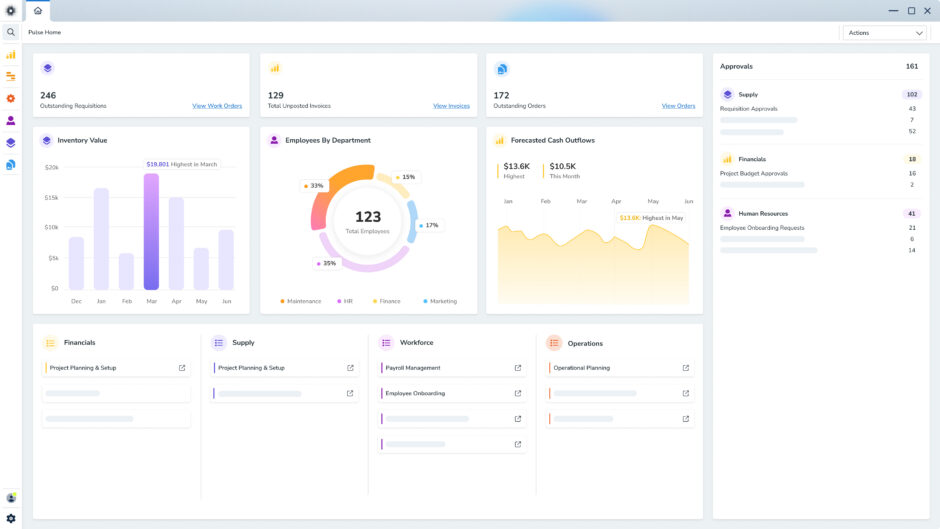
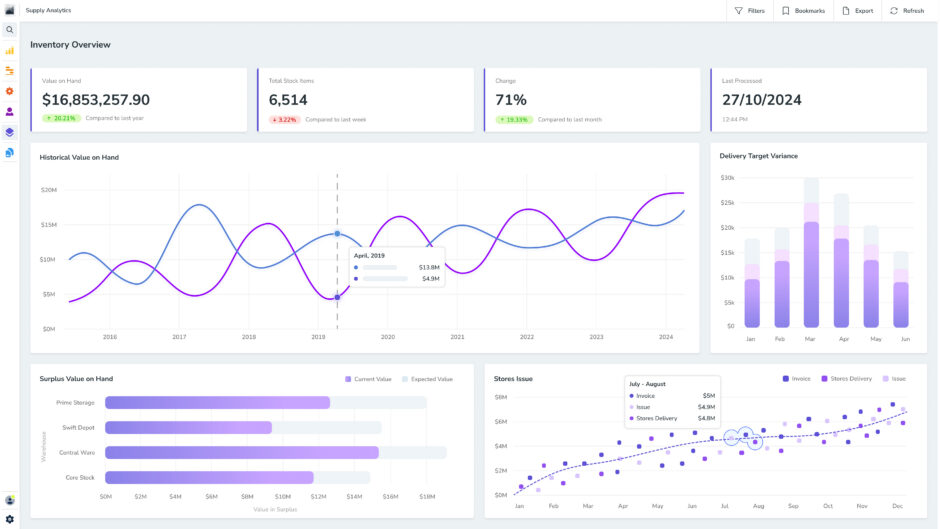
Custom dashboards and real-time reports let you track performance instantly, so you’re always in the know.
Want to see how a supply chain delay impacts sales?
Or how marketing spend is driving revenue?
ERP lays it all out—no guesswork required. React quickly to market changes, highlight new opportunities, and refine business strategies with unrivalled agility.
Stay secure and compliant
From financial audits to industry regulations, compliance isn’t optional. ERP systems can automate compliance tracking and audit reporting, so your business stays in check without the manual burden of paperwork.
With built-in security protocols and access controls, only the right people see sensitive data—keeping fraud, errors, and cyber threats at bay. Cloud-based ERP adds an extra layer of protection with real-time security updates and encrypted backups.
Mitigate risks before they cause damage
ERP gives you full visibility into every part of your business, helping teams spot issues before they spiral. Whether it’s inventory shortages, late payments, or operational bottlenecks, ERP flags the risks early so you can act fast.
Financial controls are stronger too—no more surprise expenses or missing invoices. Defined workflows and approval layers keep spending in check and prevent fraud.
Strengthen business-wide collaboration
With a single source of truth, teams stop working in isolation. ERP connects every department, making it easy to share critical data like purchase orders, sales forecasts, and customer feedback in real time.
Imagine finance, marketing, and operations all working from the same numbers, cutting down on misalignment and unnecessary back-and-forth. Fewer emails, fewer meetings, and faster, better decisions.
Scale without the growing pains
The right ERP grows with your business, handling increasing data, new locations, and more complex operations without breaking a sweat. Cloud-based ERP makes scaling even easier, letting you expand without costly infrastructure upgrades.
Need to add new features? No problem. Modular ERP lets you turn on new functions as needed, so you’re always working with the right tools at the right time.
Future-proof your business
ERP isn’t just about fixing today’s inefficiencies—it’s about setting your business up for long-term success. Whether it’s AI-powered automation, predictive analytics, or seamless integrations, ERP keeps you ahead of the curve.
By eliminating bottlenecks, enhancing visibility, and empowering smarter decisions, ERP gives you the flexibility and confidence to scale, innovate, and stay competitive—no matter what the future holds.
Common ERP system components
Finance
At the heart of any ERP is financial management. It keeps a business financially sound by tracking every transaction, managing revenue, and ensuring compliance. Instead of juggling spreadsheets and separate accounting tools, everything is centralised.
The system automatically reconciles accounts, generates financial reports, and helps businesses maintain a clear view of their cash flow.
Decision-makers can see profits, expenses, and financial trends in real time, allowing them to pivot quickly when needed.
Human resources
Managing a workforce involves more than just payroll. ERP takes care of employee records, time tracking, and benefits administration, ensuring HR teams spend less time on paperwork and more time on strategy.
Workforce analytics help businesses understand productivity trends, optimise staffing, and create a workplace that runs smoothly and efficiently.
Procurement & supply
Managing suppliers, purchasing materials, and keeping the supply chain running smoothly is complex, but ERP simplifies it.
Automated procurement processes eliminate over-ordering or stock shortages, while real-time tracking keeps teams informed about inventory levels, supplier performance, and shipment status.
Whether a business is sourcing raw materials for manufacturing or ensuring warehouses are stocked with the right products, ERP ensures orders are placed, received, and managed without delays or excess costs.
Order & inventory management
From the moment an order is placed to the second it reaches the customer, ERP tracks and prioritises every step. It updates inventory in real time, ensuring businesses know exactly what’s in stock, what’s selling fast, and what needs restocking.
No more guessing, no more delays—just seamless order fulfilment that keeps customers happy and warehouses running smoothly.
Manufacturing & production
For companies producing goods, ERP acts as a central command centre for the entire manufacturing process. It aligns production with demand, monitors work in progress, and ensures that every product meets quality standards.
Advanced planning tools help businesses allocate resources efficiently, reducing waste and maximising output. The knock-on effect is faster production cycles, fewer errors, and lower costs.
Types of ERP deployment
When it comes to ERP, one size definitely doesn’t fit all. The right deployment model depends on your business structure, IT resources, security needs, and growth plans. While the traditional debate is on-premises vs. cloud, modern ERP solutions offer more flexibility than ever, including hybrid setups and multiple cloud variations.
Here’s a breakdown of the main deployment models and what makes each one unique:
On-premise ERP
On-premises ERP is the traditional approach, where the software is installed and managed on a company’s own servers and hardware. This setup ensures maximum control over the system, data, and security.
- Total ownership – The company has complete control over customisations, security settings, and system performance.
- Data stays in-house – All information is stored on local servers, which can be beneficial for businesses with strict compliance or security requirements.
That said, full control comes with added responsibility:
- Higher upfront costs – Businesses must purchase hardware, licences, and infrastructure.
- Ongoing maintenance – IT teams are responsible for security, updates, and troubleshooting, requiring in-house expertise.
On-premises ERP is best suited for large enterprises with the budget, IT resources, and compliance needs that justify managing their own system.
Cloud-based ERP
Cloud ERP removes the need for in-house servers by running on remote, third-party infrastructure. Instead of buying software outright, businesses pay a subscription fee for a SaaS (Software-as-a-Service) model, where the provider handles security, updates, and maintenance.
This approach slashes IT overhead, ensures teams always have access to the latest version, and allows employees to log in from anywhere via a web browser.
There are two main types of cloud ERP: hosted cloud and true cloud.
Hosted cloud gives businesses ownership of their software licence but runs it on rented, third-party-managed servers. This setup allows for greater control and customisation but still requires some IT oversight.
True cloud, or multi-tenant ERP, operates in a shared environment where multiple businesses use the same software instance.
This option keeps costs low, automates updates, and removes the need for in-house IT management, making it the go-to choice for companies that want a hassle-free, future-proof solution.
Hybrid ERP
Hybrid ERP is a two-tier model that blends on-premises and cloud deployment. It empowers businesses to keep certain applications on-site while using the cloud for others.
- Best of both worlds – Businesses can retain legacy systems or applications that must stay on-premises due to compliance or security needs while benefiting from cloud scalability for other functions.
- Flexible transition – Companies can gradually shift to the cloud rather than making an all-at-once move.
Hybrid ERP is often used as a stepping stone for organisations looking to transition fully to the cloud but needing to maintain on-premise infrastructure for regulatory reasons or specific business operations.
Which ERP should my business use?
With so many benefits, it’s clear that an ERP system is a game-changer for businesses of all sizes.
But the real question is: Which ERP solution is the right fit for your company?
The answer depends on several factors, including your long-term goals based on industry and business size. Let’s take a look at each one.
Generic vs industry-specific
One of the first decisions you’ll need to make is whether to go with a general ERP or an industry-specific solution.
General ERP systems offer broad functionality that works across various industries. They provide core business management features but may require customisations, add-ons, or workarounds to fully meet your needs. While they can be a good starting point, frequent modifications can add complexity and unexpected costs.
Meanwhile, industry-specific ERP systems are designed with sector-specific challenges in mind. These solutions come with built-in features tailored to your industry, reducing the need for extensive customisation. This often leads to faster ROI, increased efficiency, and smoother operations from day one.
Businesses across various sectors rely on ERP for optimised workflows, better visibility, and real-time decision-making.
Here’s how ERP can fuel growth in different industries:
- Manufacturing – Tracks inventory, optimises production schedules, controls costs, and ensures quality standards.
- Professional services – Helps manage project timelines, resource allocation, and financial health.
- Utilities – Manages assets, forecasts demand, and optimises spare parts for infrastructure maintenance.
- Logistics and distribution – Improves inventory tracking, reduces costs, and speeds up order-to-cash cycles.
Size
Small business ERP
For small businesses looking to replace manual processes or disconnected tools, cloud-based ERP is often the best option. It offers low upfront costs, fast setup, and easy scalability as the company grows.
When selecting an ERP, small businesses should:
- Identify core needs to avoid overpaying for unnecessary features.
- Prioritise ease of use to reduce employee training time.
- Ensure the system is scalable, allowing for future expansion.
Mid-size business ERP
Mid-sized companies need ERP solutions that can handle growing operational demands while remaining cost-effective. Many choose modular cloud ERP systems that allow for gradual expansion.
Key considerations for a midmarket ERP include:
- Look for built-in analytics and best-practice workflows.
- Choose a system that can integrate with existing tools and adapt as business needs evolve.
- If compliance regulations restrict cloud adoption, consider a hybrid or on-premises deployment.
Enterprise ERP
Large businesses with multiple locations, subsidiaries, and high transaction volumes require an ERP that can handle complex data, automation, and global operations.
Here’s what large enterprises should look for in an ERP platform:
- AI-driven insights and automation to enhance decision-making.
- A system that supports multi-entity, multi-currency, and global compliance.
- Flexibility between cloud, on-premises, or hybrid setups to match IT infrastructure.
Many enterprises are transitioning to cloud ERP to gain agility, improve security, and future-proof their systems. Some opt for a two-tier ERP strategy, using a cloud-based ERP for specific business functions while maintaining a legacy on-premises system for core operations.
ERP implementation
Rolling out an ERP system is a big move—one that can either revolutionise your operations or turn into a costly, time-consuming headache.
The difference? Smart planning.
The complexity, timeline, and cost of implementation depend on factors like deployment method, business size, and system requirements, but a clear strategy will keep things on track.
Here’s the playbook for a smooth ERP launch:
- Define and plan: Start with a cross-functional team to map out exactly what your business needs from an ERP. Identify the bottlenecks, inefficiencies, and gaps in your current setup so the new system delivers real value.
- Choose the right ERP: With a clear requirements list, compare ERP solutions and find the one that fits your business, supports all departments, and scales with growth. The right choice makes all the difference.
- Design the system: It’s time to align the ERP with your workflows. Which processes stay? What needs tweaking? Do you need custom features? This phase ensures that the system works for you—not the other way around.
- Build and train: IT teams (internal or external) configure the software and migrate data. Meanwhile, employee training begins—because even the best ERP is useless if no one knows how to use it.
- Test, test, test: No skipping this step! Real users need to test every function to catch issues before launch. Glitches, missing data, or broken workflows? Fix them now.
- Go live: Time for action. Some businesses roll out in phases, others go all in. Expect some hiccups, but solid training and support will keep things running smoothly.
- Optimise and support: ERP isn’t a set-it-and-forget-it system. Keep refining workflows, update configurations, and ensure employees have ongoing support to get the most from the platform.
A well-executed ERP implementation streamlines operations, improves efficiency, and sets your business up for long-term success—but only if you get it right from the start. Plan smart, execute smoothly, and make your ERP work for you.
Best practices for a successful setup
Implementing an ERP system is never a plug-and-play process—it takes time, effort, and careful execution. But while no rollout is entirely hassle-free, some implementations run far smoother than others.
Follow these best practices to minimise roadblocks and set your business up for success.
Get leadership buy-in early
An ERP implementation impacts every part of the business, so executive sponsorship is critical. Secure support from multiple leaders across departments to ensure alignment, secure funding, and drive company-wide adoption.
Start planning before you think you need to
Success starts long before the system goes live. Give yourself ample time to map out ERP requirements, prioritise workflows, and evaluate vendors. Define what needs fixing and how ERP can help—rushing through this stage leads to costly mistakes down the line.
Keep communication open
An ERP project affects everyone, from finance and HR to sales and operations. Keep teams informed, involve key users in decision-making, and ensure the software is designed to support day-to-day workflows. Continuous feedback and cross-team collaboration reduce resistance and improve adoption.
Set realistic expectations
ERP implementation isn’t a quick fix. Be upfront about the time, cost, and effort required—and expect a few bumps along the way. Establish clear milestones and budgets, and make sure employees understand the temporary disruptions that come with the transition.
Define the right KPIs from the start
What does ERP success look like for your business? Work with stakeholders to select key performance indicators (KPIs) that align with your company’s long-term goals. Tracking the right metrics ensures you can measure progress and continuously optimise your ERP system.
By following these best practices, businesses can streamline ERP implementation, reduce frustration, and maximise return on investment—turning a complex project into a strategic advantage.
ERP integration
When implementing an ERP system, businesses often face a key decision—which existing systems should be replaced, integrated, or left as standalone solutions?
Most companies already use various software tools, some of which can be consolidated into the ERP, while others may need to remain in place and connect seamlessly.
Modern ERP platforms offer flexibility by integrating with third-party software using connectors, APIs, or customised adapters. This integration creates a unified data flow across different business functions, improving efficiency, enhancing customer experiences, and strengthening collaboration between teams and external partners.
Deciding whether to replace or integrate an existing system with your ERP comes down to three key factors:
Does the existing system still meet your needs?
If your current software is outdated, inefficient, or no longer fit for purpose, switching to an ERP module that offers the same functionality (or better) might be the smarter move.
Is a reliable connector available?
If the existing system is essential, check if there’s a robust integration option—either from the ERP vendor, the third-party software provider, or a trusted third party.
However, be aware that not all connectors are created equal.
Some work seamlessly, while others may require frequent updates to remain compatible with ERP upgrades. Poorly maintained connectors can cause disruptions or even block future system upgrades.
Does the connector provide real-time, bidirectional data flow?
Some integrations sync data instantly, while others only update on a set schedule (daily, weekly, etc.).
Additionally, some connectors only push data in one direction—for example, sending inventory updates to the ERP but not reflecting order changes back into the inventory system.
If your business relies on highly customised configurations, make sure the connector can handle all relevant data points.
Remember that if you choose to keep specialised software alongside your ERP, ongoing maintenance of integrations will be essential.
That means every time your ERP or an integrated system gets updated, you’ll need to verify that data flows correctly and that customisations continue to work.
ERP costs explained
ERP pricing isn’t one-size-fits-all. The cost depends on factors like vendor choice, deployment method, and the number of modules you need.
Systems designed for fast-growing businesses are generally more affordable, while enterprise-level solutions come with a steeper price tag.
Moreover, cloud-based ERP (SaaS) keeps upfront costs low—there’s no need to buy servers or hire in-house IT experts. Instead, you pay a recurring fee, often per user, and the provider handles maintenance, security, and updates.
On-premises ERP is a larger investment upfront, requiring a one-time software licence plus costs for hardware, IT staff, and ongoing maintenance. Upgrades and security measures add to the long-term expense.
Hybrid ERP combines both approaches, often making it the most expensive due to overlapping infrastructure and subscription costs.
But software licences are just the beginning.
Implementation, training, customisation, support, and future upgrades all factor into the total investment.
When comparing options, don’t just look at the price tag—evaluate both short-term and long-term costs to find the right fit for your business.
What’s next for ERP: upcoming trends to keep track of
The pace of digital transformation is accelerating, with businesses laser-focused on eliminating inefficiencies and outdated systems that slow them down. As companies push for more agility, they’re demanding ERP solutions that are faster, smarter, and more adaptable.
Here are four key trends shaping the future of ERP:
Advanced AI
ERP systems are getting an intelligence boost with generative AI, transforming how businesses automate tasks and optimise processes.
Beyond handling routine work, AI-driven ERP can adapt workflows in real time, providing dynamic adjustments based on evolving needs.
One of the biggest shifts?
Natural language interaction. Instead of navigating complex menus, users can simply ask the system questions—“What’s our current inventory level?” “Show me sales trends for the last quarter”—and get instant, data-driven answers.
This makes ERP more accessible to non-technical users while unlocking deeper insights across the organisation.
Personalised features
ERP is no longer a rigid, universal system. With low-code and no-code platforms, users can tailor dashboards, workflows, and interfaces to fit their unique needs—without IT intervention.
Expect more AI-powered searches, personalised chat assistants, and adaptive dashboards that adjust to individual roles.
Whether it’s a factory worker needing quick production updates or an executive reviewing financial forecasts, ERP is evolving to deliver a more intuitive, user-driven experience across all devices.
Vertical integration
Businesses have long struggled with the trade-off between specialised software and fully integrated ERP solutions. Now, that’s changing. The latest ERP systems are modular and extendable, allowing companies to plug in industry-specific features without disrupting core operations.
This shift means companies no longer have to choose between best-in-class functionality and seamless integration. Instead, they get custom-fit solutions within a unified system, reducing data silos and messy integrations.
Cloud-based solutions
The shift to cloud-based ERP isn’t slowing down—it’s speeding up. Companies are moving away from on-premises systems in favour of anywhere access, lower IT costs, stronger security, and immediate updates.
With businesses needing instant scalability and seamless connectivity, cloud ERP is becoming the go-to solution. Whether managing supply chains, financials, or customer data, the cloud ensures that teams can access critical information from any device around the clock.
Get the ultimate ERP system for your business
Your business isn’t built on guesswork, and neither should your systems be. An ERP is the unified source of truth that keeps everything running smoothly. By integrating finance, HR, supply chain, and operations into a single platform, it eliminates inefficiencies, automates the mundane, and turns raw data into real insights.
But an ERP isn’t just about working smarter today—it’s about scaling for what’s next. Whether you’re looking to expand, tighten compliance, or refine your customer experience, the right system grows with you, adapting to new challenges and opportunities as they come.
Now that you know what an ERP system is, you can take the next step.
Born from the demanding world of mining, Pulse ERP has evolved into a powerhouse solution for businesses that refuse to settle for slow, expensive, and rigid software.
Trusted by industry giants like Glencore, Rio Tinto, Vale, and Centennial Coal, Pulse delivers deep functionality without the price tag of Tier 1 systems like SAP and Microsoft Dynamics.
No matter your sector, Pulse ERP puts real-time insights, automation, and control at your fingertips—helping you stay ahead, stay efficient, and, most importantly, stay in charge.